Jigsaw Puzzle Game for iPhone
Over a thousand HD pictures to assemble, plus animated Live puzzles.
- App Store name
- Jigsaw Puzzle HD - Brain Games
- Category
- Games
- Price
- Free · In-App Purchases
- Requires
- iOS 11.0+
- Languages
- 1
- On the App Store since
- 2021
- Last updated
- 2023
What it does for you
A jigsaw on a phone has one advantage over the cardboard kind: nothing gets lost and nothing has to be cleared off the table. Jigsaw Puzzle HD holds over a thousand HD photographs sorted into categories — animals, food, cities and countries, flowers — and keeps every board exactly where you left it.
The Live tab is what a paper puzzle cannot do. Those pictures begin to move once the final piece is placed, so the scene you assembled plays back at you.
About this app
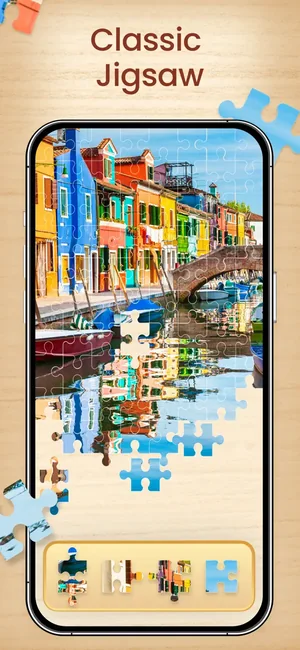
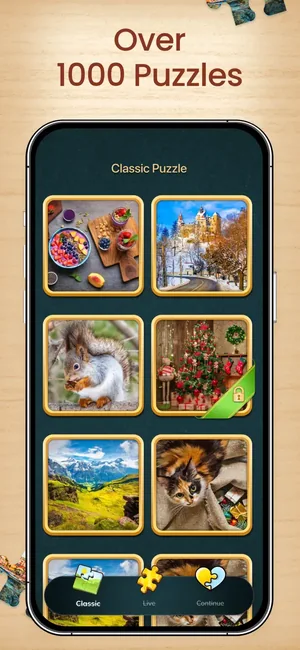
Jigsaw Puzzle HD is a picture library you assemble at your own pace. The Classic tab holds over a thousand HD photographs sorted into categories — animals, food, cities and countries, flowers and more — and you pick one, drag the pieces from the tray at the bottom, and stop whenever you like; Continue keeps the board exactly as you left it.
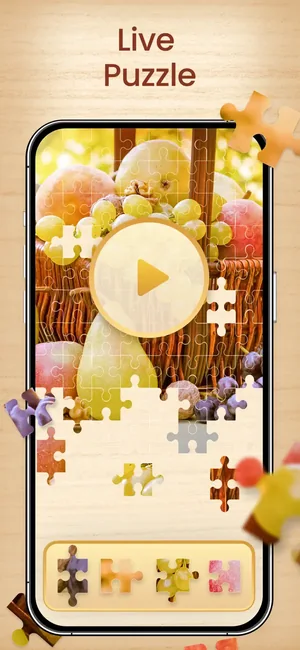
The Live tab is the difference from a paper puzzle: those pictures start moving once the final piece goes in, so the harbour you have been assembling turns into a scene that plays.
Key features
- Over 1000 HD puzzle pictures in the Classic library
- Live puzzles that animate once the last piece is in place
- Categories including animals, food, cities and countries, and flowers
- New jigsaw pictures added regularly
When people use it
Ten quiet minutes
Pick a picture, place a few pieces, close the app. Continue puts the board back the way it was, so a puzzle can live across a week of short sittings.
Something to do that is not a feed
No timer pressure and no opponent — the Classic mode is deliberately unhurried.
Puzzling with someone else
A phone or tablet on the table between two people works the same way the cardboard version did, without the missing piece under the sofa.
How it works
Choose a picture
The Classic tab lists the library by category; tap any tile to open that board.
Assemble it
Pieces wait in the tray along the bottom edge; drag them onto the picture area and they lock into place when they fit.
Stop whenever
Leave mid-board and pick it up later from Continue — nothing is lost by closing the app.
Try a Live puzzle
The Live tab holds the animated pictures. Finish one and it starts to move.
Good to know
- Some pictures in the library are locked and unlock through a purchase — the padlock badge on a tile tells you which before you open it.
- Large piece counts on a small phone screen mean a lot of zooming; an iPad or a larger iPhone is easier for the busier pictures.
- This is a picture-assembly game. It is not a brain-training programme and makes no claim about memory or cognition.
Pricing and privacy
Free · In-App Purchases. Subscriptions and purchases are handled by Apple; you can review or cancel them in your Apple Account settings.
Privacy Policy · EULA · Support and refunds
Facts on this page come from the App Store listing and the app's own screens, and were last checked on . Something out of date? Tell us.
Questions about Jigsaw Puzzle HD
How many puzzles are there?
Over a thousand HD pictures in the Classic library, in categories from animals and food to cities and flowers, with new ones added regularly.
What is a Live puzzle?
A picture that animates once you place the last piece — the assembled scene starts to move instead of sitting still.
Do I lose my progress if I close the app?
No. An unfinished board is waiting under Continue when you come back.