Sudoku for iPhone — Daily Classic Puzzles
Classic sudoku from easy to expert, with daily challenges and solve statistics.
- App Store name
- Sudoku Classic Puzzles Games
- Category
- Utilities
- Price
- Free · In-App Purchases
- Requires
- iOS 14.0+
- Languages
- 11
- On the App Store since
- 2023
- Last updated
- 2023
What it does for you
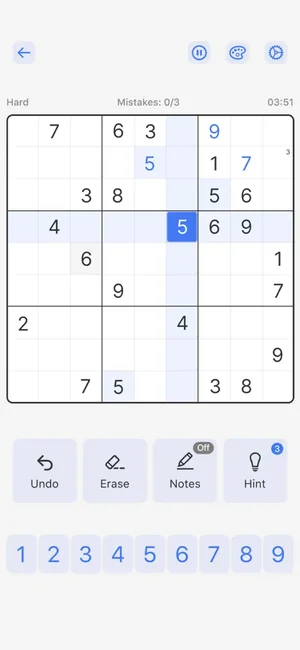
Classic sudoku with the tools that make it pleasant rather than fiddly: notes for pencilling in candidates, an eraser, undo, and a hint when a grid genuinely stalls.
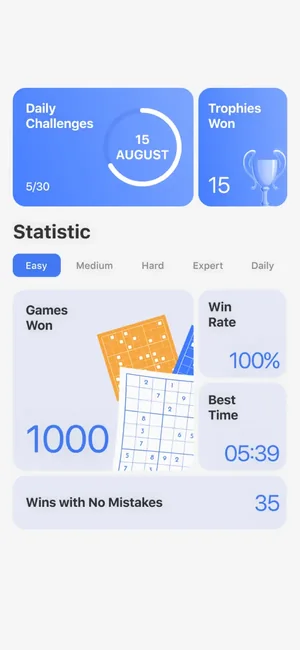
Around the puzzle sits a reason to come back — a daily challenge on a monthly calendar with a trophy for each completed day, and a statistics screen that shows games won, win rate and your best solve time by difficulty.

About this app
Sudoku is the classic number puzzle in a clean, quick form: five difficulty levels, from a first easy grid to boards that make you plan several moves ahead.
Monthly calendar challenges, achievements and timed events give the daily round a purpose, and progress tracking shows how your solving actually improves.
Key features
- Five difficulty levels, from a first easy grid to boards that need planning
- A new puzzle every day on the monthly calendar, with achievements and timed events
- Timed solving with statistics that show how your times are actually moving
When people use it
One puzzle a day
The calendar marks each completed day, which turns a habit into something visible.
Choosing your difficulty
Five levels, from a first easy grid to boards that need you to plan several moves ahead.
Working out loud
Notes mode is how experienced solvers work: pencil the candidates into a cell and the eliminations become obvious.
Seeing whether you improve
Best solve time and win rate are tracked per difficulty, so progress is measurable rather than felt.
How it works
Pick a difficulty or the daily puzzle
Easy through expert, or the calendar's puzzle for today.
Fill in what is certain
Start with rows, columns and boxes that already have most of their numbers.
Use notes for the rest
Pencil candidates into a cell; when only one survives elimination, it is the answer.
Undo rather than restart
Undo and erase step back through mistakes without losing the grid.
Take a hint if stuck
A hint moves a stalled grid on rather than ending the session in frustration.
Good to know
- Hints and undo make a puzzle easier by design. If you want a pure solve, the discipline has to come from you — the app will not stop you using them.
- Difficulty labels are the app's own rating, not a standard. An 'expert' grid here is not directly comparable to one in another app or a newspaper.
- This page does not claim offline play, puzzle counts or cloud sync, because none of those are stated for this listing.
- It is a number-placement puzzle. No claim is made about memory, concentration or cognitive benefit.
Pricing and privacy
Free · In-App Purchases. Subscriptions and purchases are handled by Apple; you can review or cancel them in your Apple Account settings.
Privacy Policy · EULA · Support and refunds
Facts on this page come from the App Store listing and the app's own screens, and were last checked on . Something out of date? Tell us.
Questions about Sudoku Classic Puzzles Games
How many difficulty levels are there?
Five, from a first easy grid up to boards that need you to plan several moves ahead. Statistics are tracked separately per level.
Is there a daily puzzle?
Yes — a daily challenge on a monthly calendar, with a trophy marking each completed day.
What are notes for?
Pencilling the possible numbers into a cell. It is how most experienced solvers work: once elimination leaves one candidate, the answer is there.
Does using a hint spoil my statistics?
Hints exist to move a stalled grid on. How strictly you use them is your call — the app tracks games won, win rate and best time either way.