
Guitar Tuner & Metronome for iPhone
A chromatic tuner with noise reduction and a metronome for alternative tunings.
- App Store name
- Guitar Tuner & Tempo Metronome
- Category
- Music
- Price
- Free · In-App Purchases
- Requires
- iOS 10.0+
- Languages
- 11
- On the App Store since
- 2019
- Last updated
- 2021
What it does for you
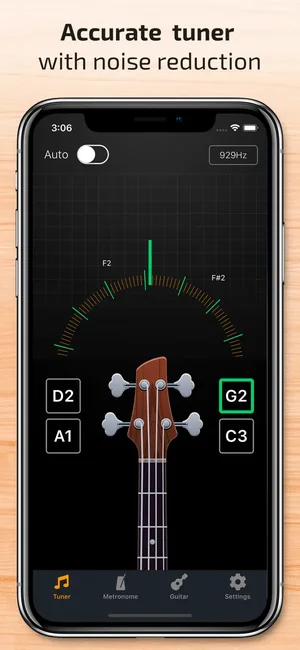
Two things every player needs and neither of which is worth carrying separately: a chromatic tuner that listens through the phone microphone, and a metronome. Pluck a string and the tuner names the note and shows how far off you are; noise reduction is there because tuning rarely happens in a silent room.
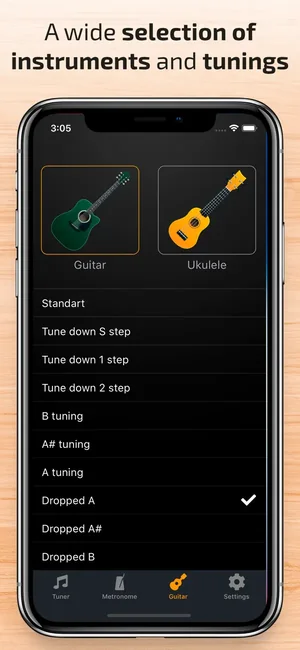
The tuning list covers standard plus drop and alternative tunings, and instruments beyond guitar — ukulele and bass among them — so one app follows you across the case.
About this app
Our app is a must-have for everyone who's connected their lives with music! You can quickly and easily tune your guitar, ukulele or bass through your smartphone microphone. Just touch the strings on your instrument and the tuner will immediately show the necessary tuning.
High-quality sound recognition - Noise reduction technology - Lots of modes and tunings - Tuning for guitar, ukulele, bass, etc. - Simple and intuitive interface - Instant response - Drop and Double Drop tunings - Built-in metronome
Key features
- High-quality sound recognition
- Noise reduction technology
- Lots of modes and tunings
- Tuning for guitar, ukulele, bass, etc
When people use it
Tuning before you play
The everyday case: hold the phone near the instrument, pluck each string in turn, adjust until the display settles.
Alternative and drop tunings
Drop D, open tunings and the rest are in the tuning list, so you are not counting semitones in your head.
Another instrument in the case
Ukulele and bass are covered by the same tuner, which matters if you play more than one.
Practising to a click
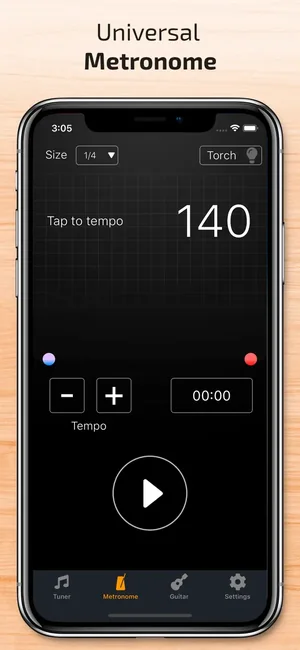
The metronome runs to a set BPM with tap-to-tempo, so you can set the feel by tapping rather than guessing a number.
How it works
Allow microphone access
The tuner hears the string through the phone microphone; without the permission it has nothing to listen to.
Pick the instrument and tuning
Choose from the tuning list — standard, drop or an alternative — before you start.
Pluck one string at a time
Let the note ring on its own. Overlapping strings give the tuner two pitches to choose between.
Adjust to centre
The display names the note and shows the direction of the error; turn the peg until it settles.
Set the metronome
Enter a tempo or tap it in, and practise against the click.
Good to know
- Microphone tuning depends on the room. Noise reduction helps, but a loud band room, a television or an air conditioner will still make the reading jump — get closer to the instrument and let one note ring alone.
- This page does not state a tuning accuracy figure in cents, because no test method is published for this app. If you need certified accuracy, use a dedicated instrument.
- Very low notes — the bottom of a bass — are the hardest case for any microphone tuner, and readings settle more slowly there.
- A clip-on tuner reads vibration through the body of the instrument rather than air, so it still wins in a noisy room. This is the pocket option, not a replacement for one.
Pricing and privacy
Free · In-App Purchases. Subscriptions and purchases are handled by Apple; you can review or cancel them in your Apple Account settings.
Privacy Policy · EULA · Support and refunds
Facts on this page come from the App Store listing and the app's own screens, and were last checked on . Something out of date? Tell us.
Questions about Guitar Tuner & Tempo Metronome
How do I tune a guitar with my iPhone?
Allow microphone access, pick your tuning, then pluck one string at a time and let it ring. The tuner names the note and shows which way to turn the peg. Work through the strings and re-check the first one at the end — tuning one string shifts the tension on the others.
Does it tune a ukulele or a bass?
Yes — the tuning list covers guitar, ukulele and bass among others, with standard, drop and alternative tunings.
How accurate is it?
We do not publish an accuracy figure, because there is no test method behind one for this app. It is a chromatic tuner with noise reduction, suitable for everyday tuning; a dedicated hardware tuner remains the reference.
Why does the reading jump around?
Almost always background noise or two strings ringing at once. Move closer to the instrument, damp the other strings, and let a single note sound on its own.