Guitar Simulator for iPhone
Play acoustic, electric or bass on screen — every note sampled from a real guitar.
- App Store name
- Real Guitar : Chords & Tabs
- Category
- Music
- Price
- Free · In-App Purchases
- Requires
- iOS 11.0+
- Languages
- 11
- On the App Store since
- 2020
- Last updated
- 2022
What it does for you
Real Guitar turns the screen into a fretboard you can actually play. The notes are not synthesised: each one was recorded from a real instrument by professional musicians, which is why the acoustic, electric and bass voices sit differently under your fingers.
It is an instrument, not a course. There is no lesson path and no progress score — you turn the phone sideways, pick a guitar, play, and hit record when something is worth keeping.
About this app
The App Store listing states that every sound was recorded from a real guitar by professional musicians. What you get on screen is three separate instrument voices — acoustic, electric and bass — on the same fretboard.
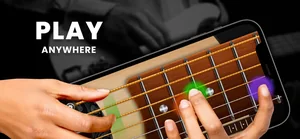
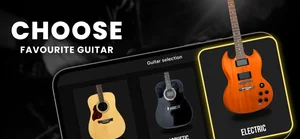
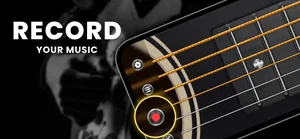
Turn the phone sideways and you get the full fretboard to play on, a picker for the three instruments, and a record button that captures what you played. It is an instrument to play, not a lesson course.
Key features
- Sounds recorded from real guitars by professional musicians (per the App Store listing)
- Free play mode across the full fretboard in landscape
- Three instruments to switch between: acoustic, electric and bass
- Built-in recorder for what you play
When people use it
Catching an idea away from your guitar
A riff turns up on the train and the real instrument is at home. Open the app, play it on the fretboard, and record it before it goes.
Hearing a part on a different instrument
The same line played on the acoustic, the electric and the bass sounds like three different ideas. Switching instrument takes one tap.
Playing where a real guitar would not be welcome
Headphones, a hotel room, a late night — the on-screen guitar makes no noise anyone else has to hear.
How it works
Turn the phone sideways
Landscape gives you the whole fretboard; that is where the app is meant to be used.
Choose your instrument
The picker offers acoustic, electric and bass — three distinct instrument voices you switch between.
Play
Free play mode leaves the fretboard open — strum and pick where you want, at whatever tempo you want.
Record what you played
The record control sits over the fretboard, so capturing a take does not mean leaving the instrument.
Good to know
- This is a guitar simulator. It does not read tablature and it does not teach you chords step by step — if you want lessons or a chord dictionary, this is not the app for that.
- A touchscreen cannot reproduce bends, muting or picking dynamics the way strings do. It is closer to a sketchpad than a substitute for the instrument.
- Audio through Bluetooth headphones is delayed by the headphones themselves, which is noticeable when playing. Wired output or the phone's speaker responds faster.
Pricing and privacy
Free · In-App Purchases. Subscriptions and purchases are handled by Apple; you can review or cancel them in your Apple Account settings.
Privacy Policy · EULA · Support and refunds
Facts on this page come from the App Store listing and the app's own screens, and were last checked on . Something out of date? Tell us.
Questions about Real Guitar
Does it show chords and tablature?
The app is built around free play on a sampled fretboard, and we only describe what its screens show: instrument selection, the landscape fretboard and recording. It is not a chord dictionary or a tab reader.
Which instruments are included?
Three: acoustic, electric and bass, each recorded from a real instrument.
Can I keep what I play?
Yes — there is a record button on the playing screen so a take can be captured without leaving the fretboard.