Secure VPN for iPhone
Route your traffic through a server abroad and watch the speed while you are connected.
- App Store name
- Secure VPN & Fast Proxy Master
- Category
- Utilities
- Price
- Free · In-App Purchases
- Requires
- iOS 14.0+
- Languages
- 10
- On the App Store since
- 2019
- Last updated
- 2024
What it does for you
A VPN app does one mechanical thing: it sends your traffic to a server somewhere else first, so the services you open see that server's address rather than the one your provider handed your phone. Secure VPN is a plain version of that — a list of countries, a connect button, and a screen that tells you what is actually happening.
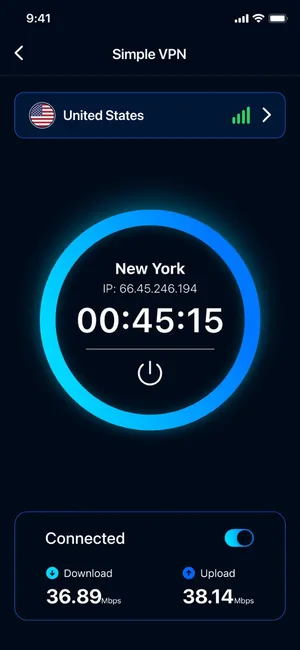
Once a session starts you see the city you came out in, the address you were given, how long you have been connected, and live download and upload figures, so you can tell straight away whether the tunnel is fast enough for what you were about to do.
About this app
Secure VPN sends your iPhone's connection through a proxy server in a country you choose, so the sites and services you open see that server's address instead of the one your provider gave you.
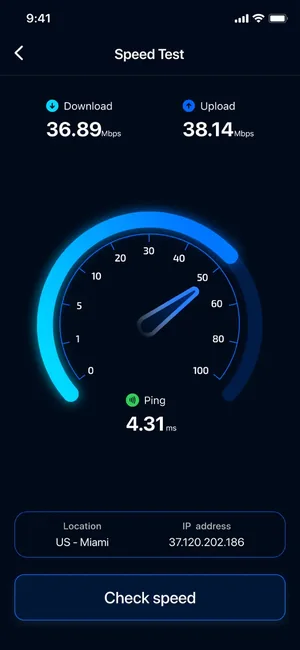
Pick a location from the server list, tap connect, and the app shows the city, the address you have been assigned and how long the session has been running, with live download and upload figures underneath. A built-in speed test measures the connection while the VPN is on.
Key features
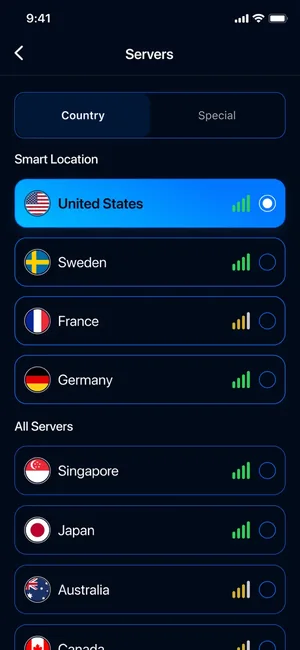
- Server locations to pick from, including the United States, Sweden, France and Japan
- Works over Wi-Fi and mobile data (LTE, 4G, 3G)
- Session screen with the assigned address, elapsed time and live download and upload speeds
- Built-in speed test you can run while the VPN is connected
When people use it
Working on a network you do not control
Hotel, airport and cafe Wi-Fi is shared with strangers. The app establishes a VPN connection through the server you picked and shows its location and status while the session runs. It does not publish which protocol or encryption it uses, so treat it as a location and routing tool rather than a guaranteed security layer.
Appearing to be somewhere else
Pick a server in the United States, Sweden, France or Japan and the sites you open resolve you to that country. Useful when a service behaves differently depending on where it thinks you are.
Checking what the tunnel costs you in speed
Every VPN slows a connection down somewhat. The built-in speed test runs while the VPN is on, so you can measure the difference rather than guess at it, and try another server if the first one is slow.
How it works
Pick a location
Open the server list and choose a country. Each entry shows a signal indicator so you can favour the ones answering well.
Connect
Tap the power control in the middle of the screen. iOS asks once for permission to add a VPN configuration — that prompt comes from the system, not the app, and it is required for any VPN on iPhone.
Check the session
The session screen shows the city, the address you have been assigned, a running timer and current download and upload speeds.
Measure it, then keep working
Run the built-in speed test if the connection feels slow, switch servers if it is, and turn the toggle off when you are done.
Good to know
- This page describes only what the App Store listing and the app's own screens show. It makes no claim about the encryption protocol, a no-logs policy, a kill switch or DNS/IP-leak behaviour, because none of those are published for this app — do not assume them.
- A VPN hides your address from the sites you visit. It does not make you anonymous: accounts you sign in to, cookies already on the device and anything you type still identify you.
- Expect some loss of speed and a little extra battery use — traffic is taking a longer path.
- What the app collects and how it is handled is described in the App Store privacy details for this listing and in our Privacy Policy.
Pricing and privacy
Free · In-App Purchases. Subscriptions and purchases are handled by Apple; you can review or cancel them in your Apple Account settings.
Privacy Policy · EULA · Support and refunds
Facts on this page come from the App Store listing and the app's own screens, and were last checked on . Something out of date? Tell us.
Questions about Secure VPN & Fast Proxy Master
Does this make me anonymous online?
No. It changes which address a website sees. It does not hide who you are from services you log into, and it is not a substitute for the privacy settings in your browser and your accounts.
Why does iOS ask permission to add a VPN configuration?
Every VPN on iPhone runs through a system VPN profile, and iOS always asks before one is installed. The prompt is from iOS itself; the app cannot route traffic without it.
Will it slow my connection down?
Usually a little, because your data travels via another country before reaching its destination. The built-in speed test measures the connection while the VPN is on, so you can compare servers instead of guessing.
Which encryption protocol does it use?
That is not published for this app, so we do not state it here. If you need a specific protocol, a documented no-logs policy or an independent audit, choose a provider that publishes those details.