Internet Speed Test App for iPhone
Measure download, upload and ping, and keep a history of every network you test.
- App Store name
- WIFI & Internet Speed Test
- Category
- Productivity
- Price
- Free · In-App Purchases
- Requires
- iOS 9.0+
- Languages
- 7
- On the App Store since
- 2019
- Last updated
- 2020
Need deeper network diagnostics? Speed Test & Wifi Analyzer is built for that
What it does for you
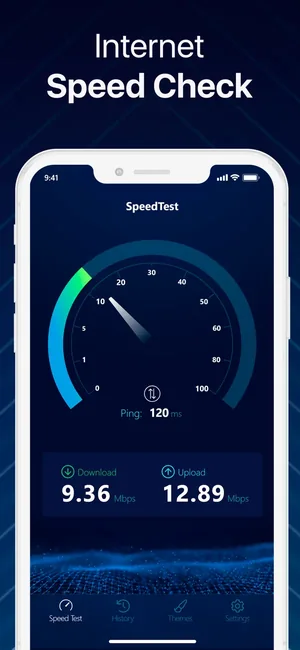
One tap, under thirty seconds, three numbers: download, upload and ping. That is the whole point — a measurement you can take the moment something feels slow, without configuring anything.
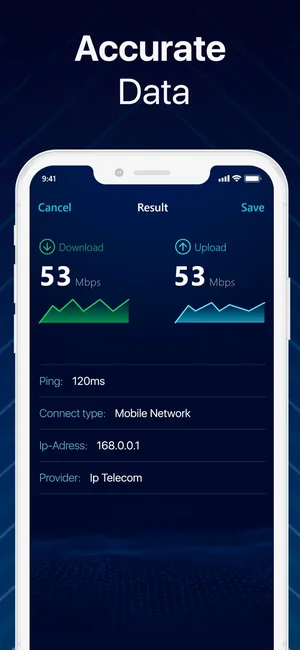
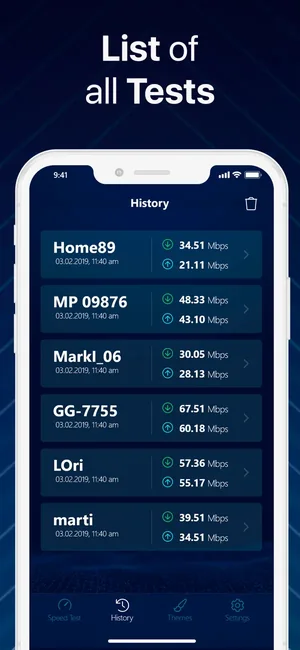
The result screen keeps the network you were on alongside the speeds, and every test goes into a history list. One reading tells you about one minute; a history tells you whether the evenings are worse than the mornings, or whether the new router actually helped.
About this app
One tap measures what your connection is doing right now — download, upload and ping — over Wi-Fi or cellular (3G, 4G, LTE), and the whole test is over in under 30 seconds.
The result screen shows the speeds alongside the network you were on, and every test is kept in a history list, so a slow evening can be compared against a fast morning, or the connection before a router change against the one after it. Results can be shared as they are.
Key features
- Download, upload and ping measured in one tap
- A full test finishes in under 30 seconds
- History of every past test with the network it ran on
- Share a result as it stands
When people use it
Something feels slow right now
The immediate case. Measure before you start rebooting things, so you know whether the line or the room is the problem.
Checking what you are paying for
Compare the result against the plan — several times, at different hours, rather than once.
Before and after a change
A new router, a moved access point, a different band: the history makes the comparison instead of memory.
Wi-Fi against cellular
Testing both from the same spot tells you quickly whether the problem is your home network or the line into it.
How it works
Stop other traffic
A download, a backup or someone streaming will show up as a slow line rather than as what it is.
Pick the connection to measure
Wi-Fi and cellular are different questions. Turn Wi-Fi off if it is the mobile connection you are testing.
Run the test
One tap; the dial moves through download, upload and ping and it is over in under thirty seconds.
Read all three numbers
Download is what you receive, upload is what you send, ping is how quickly the connection reacts.
Repeat and compare
Two or three runs, and again in the evening. The history keeps them side by side.
Good to know
- A speed test measures the path between your phone and a test server at that moment. It is not a verdict on your provider — distance to the server, time of day and other traffic all move the number.
- Wi-Fi is measured, not the line. Standing next to the router and standing across the flat give different results with the same broadband behind them.
- A VPN routes traffic further and lowers the reading. Turn it off before measuring.
- This app measures speed. It does not scan the local network, list connected devices or trace routes — those are a different job, and this page does not claim them.
Pricing and privacy
Free · In-App Purchases. Subscriptions and purchases are handled by Apple; you can review or cancel them in your Apple Account settings.
Privacy Policy · EULA · Support and refunds
Facts on this page come from the App Store listing and the app's own screens, and were last checked on . Something out of date? Tell us.
Questions about WIFI & Internet Speed Test
Why is my result lower than the speed I pay for?
Advertised speeds are the maximum the line can carry, measured under ideal conditions at the router. Wi-Fi distance, walls, the age of the phone and evening congestion all take a share before the number reaches your screen.
How often should I test?
Whenever something feels wrong, and a few times across a day before drawing a conclusion. A single reading describes one minute.
Does it show which devices are on my network?
No — this app measures speed. Listing devices, scanning ports and tracing routes is a different tool.
Should I turn off my VPN first?
Yes. A VPN sends your traffic via another server, so both speed and ping change. Measure the line first, then the VPN if you want to know its cost.