Beauty Photo Editor for iPhone
Retouch portraits: smooth skin, remove blemishes and try makeup looks.
- App Store name
- Faceon: Photo Editor & Effects
- Category
- Utilities
- Price
- Free · In-App Purchases
- Requires
- iOS 15.0+
- Languages
- 12
- On the App Store since
- 2026
- Last updated
- 2026
What it does for you
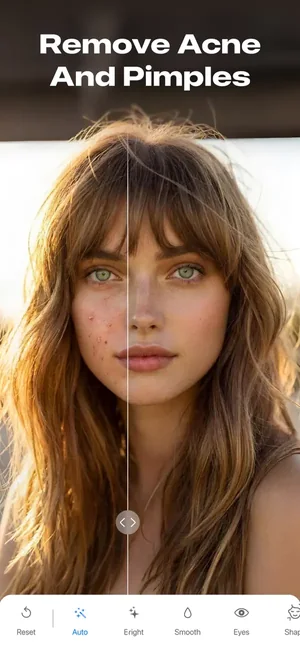
A retouching tool for portraits, with the controls a portrait actually needs: smoothing skin and correcting its tone, removing a blemish, whitening teeth, changing hair or eye colour, and adjusting the shape and size of eyes, lips, nose and brows.
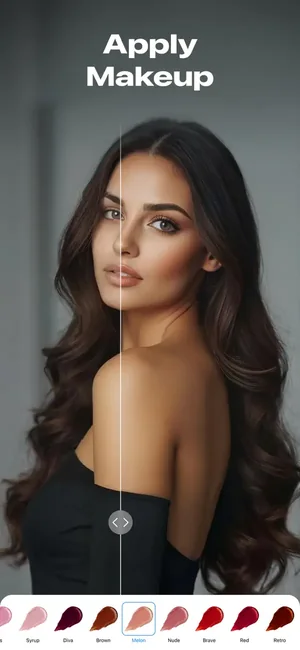
The before-and-after view is the part that keeps it honest. Retouching creeps — each small step looks reasonable, and the total does not — so seeing the original beside the edit is how you catch it.

About this app
Looking for an easy way to make your photos look more expressive? This app helps you reveal color, depth, and character in just a few taps. Whether you want a natural touch-up or a creative transformation, the app gives you control to reshape photo details with precision and ease.
Key Features - Skin smoothing and tone correction; - Teeth whitening; - Hair and eyes color change; - Shape and size control for eyes, lips, nose, and brows; - Aesthetic filters for the entire photo; - Light, texture, and overlay effects; - Multiple blur styles; - Exposure and brightness control; - Contrast and saturation tuning; - Free and preset cropping ratios; - Before & after comparison.
Key features
- Skin smoothing and tone correction
- Teeth whitening
- Hair and eyes color change
- Shape and size control for eyes, lips, nose, and brows
When people use it
One blemish on an otherwise good photo
The most common real use: a spot on the day of the shot that nobody wants to be the subject of the picture.
Evening out difficult light
Tone correction fixes the colour cast that indoor and mixed lighting leaves on skin.
A portrait for a profile
Modest smoothing and a tidy result, without turning a photograph into something else.
Trying a different look
Hair and eye colour, and makeup shades, as an experiment rather than a commitment.
How it works
Open the portrait
Start from the best frame you have; retouching cannot rescue a badly focused one.
Fix the specific things first
Remove blemishes and correct tone before reaching for global smoothing.
Smooth sparingly
A little goes a long way. Skin with no texture at all reads as fake, and that is the usual failure.
Adjust features if you want to
Shape and size controls for eyes, lips, nose and brows.
Compare before saving
Use the before-and-after view. If the person is no longer recognisable, go back.
Good to know
- Reshaping someone's face is an edit to how a real person looks. Do it to your own photos freely; do it to someone else's only with their agreement.
- Heavy smoothing removes skin texture and is instantly recognisable as retouching. The before-and-after view exists because the effect creeps.
- This is a photo editor, not identity verification. Do not use an edited portrait where a true likeness is expected — a passport, an official profile, a professional credential.
- The screenshots show an AI enhancement option; this page does not describe how it works, because that is not published for this listing.
Pricing and privacy
Free · In-App Purchases. Subscriptions and purchases are handled by Apple; you can review or cancel them in your Apple Account settings.
Privacy Policy · EULA · Support and refunds
Facts on this page come from the App Store listing and the app's own screens, and were last checked on . Something out of date? Tell us.
Questions about Faceon
Can I remove a blemish from one photo?
Yes — that is the most common use. Fix the specific spot first and leave global smoothing alone; the result looks far more natural.
How do I avoid the plastic look?
Use less smoothing than feels right and check the before-and-after view. Skin with no texture at all is what makes retouching obvious.
Can I edit a photo of someone else?
Technically yes, but reshaping how a real person looks is something to do with their agreement, not without it.
Is it suitable for a professional headshot?
For light retouching of a good photograph, yes. Anything that changes how you actually look is a poor idea where a true likeness is expected.