Pedometer for iPhone — Step & Running Tracker
Every step, counted.
- App Store name
- Pedometer - Run & Step Counter
- Category
- Health & Fitness
- Price
- Free · In-App Purchases
- Requires
- iOS 15.6+
- Languages
- 31
- On the App Store since
- 2019
- Last updated
- 2026
What it does for you
Step counting only helps if it happens without you thinking about it. Pedometer uses the motion sensor already in your iPhone: carry the phone and the day is counted — no starting a session, no holding the device, no separate tracker to charge.
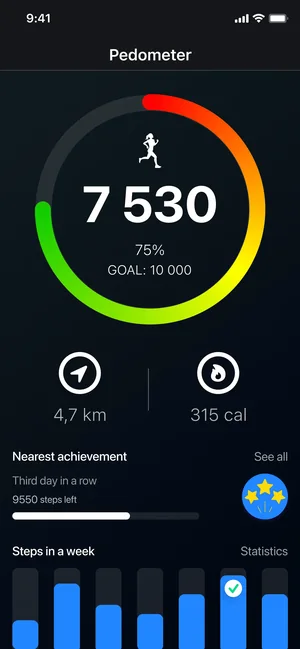
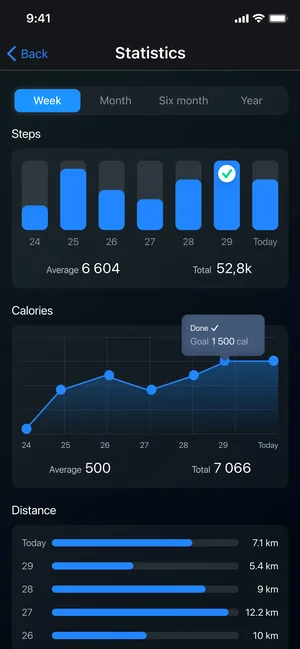
The numbers then turn into something readable: steps, calories, distance and walking or running performance, with hourly, daily and weekly statistics, daily goals and achievements. A home-screen widget keeps today's progress a glance away, and notifications can report it without opening the app.
About this app
Pedometer counts every step automatically using the phone's built-in motion sensor — no manual start, no noticeable battery drain. Carry the phone; the app does the rest, through walks, runs and ordinary days.
Clear statistics show steps, calories, distance and walking performance day by day, goals and achievements keep streaks motivating, and a home-screen widget keeps today's numbers one glance away.
Key features
- Automatic step tracking, no manual start
- Calories, distance and walking insights
- Goals, achievements and detailed statistics
- Home-screen widget with daily activity
When people use it
Keeping a daily step goal
Set a target, then watch the ring fill through the day; achievements mark the streaks you build.
Understanding a walk or a run
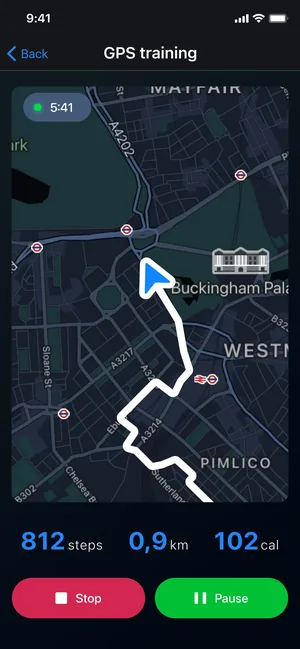
See distance and calories alongside steps, so a route means more than a raw number.
Checking progress at a glance
The home-screen widget shows today's steps and key stats without opening the app.
Looking back over a week
Hourly, daily and weekly statistics show when you actually move — and where the quiet days are.
How it works
Allow motion and health access
The app reads the built-in motion sensor and integrates with HealthKit for data such as steps, active energy, distance, height and weight.
Set your daily goal
Choose a step target that fits your routine; progress is tracked against it automatically.
Carry your phone
Tracking runs in the background — there is nothing to start or stop when you go for a walk.
Add the widget
Place the widget on your home screen to see steps and progress without opening the app.
Good to know
- Counting relies on the phone's motion sensor: for the most accurate results the listing advises using it while actively walking or running, and steps taken without the phone are not recorded.
- HealthKit access must be granted for the health metrics to be available.
- Advanced fitness metrics, custom goal options, the personal activity widget and ad-free use are part of the paid subscription.
Pricing and privacy
Free · In-App Purchases. Subscriptions and purchases are handled by Apple; you can review or cancel them in your Apple Account settings.
Privacy Policy · EULA · Support and refunds
Facts on this page come from the App Store listing and the app's own screens, and were last checked on . Something out of date? Tell us.
Questions about Pedometer
Do I need to start tracking each time I walk?
No. The app records activity in the background using the phone's motion sensor, so carrying your device is enough.
How accurate is the step count?
It uses the motion sensor built into your iPhone. Accuracy is best when you are actively walking or running with the phone on you; steps taken while the phone is elsewhere cannot be counted.
Does it drain the battery?
The app is built around the device's own motion sensor rather than continuous GPS, which its listing describes as tracking without extra battery drain.
Does it work with Apple Health?
Yes. It integrates with HealthKit for data such as steps, active energy, distance, height and weight; you grant that access on first use.