
Instagram Story Templates & Reels Maker
Story and reel templates with text, stickers, music and slideshow editing.
- App Store name
- Story Templates & Reels Maker
- Category
- Photo & Video
- Price
- Free · In-App Purchases
- Requires
- iOS 12.0+
- Languages
- 33
- On the App Store since
- 2020
- Last updated
- 2024
What it does for you
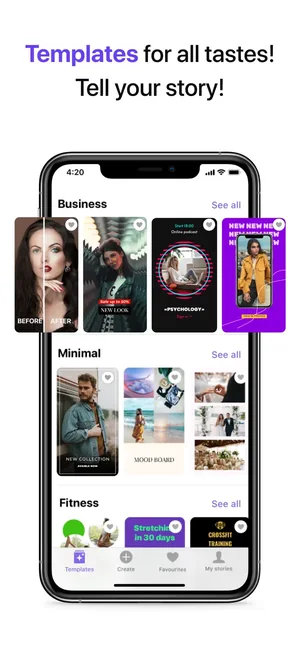
The composition work on a story or a reel is what takes the time — where the photo sits, how the text is placed, what carries the eye. Story Templates hands you that already done: pick a template from a collection, drop your own shots in, and the layout holds.
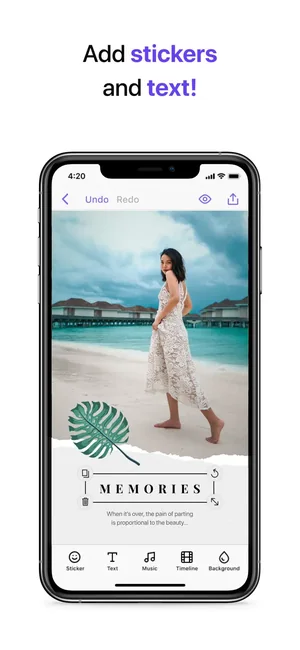
From there it is finishing rather than designing: text and stickers over the image, filters, and slideshows that move to music in the reel editor.
About this app
Story Templates turns photos into ready-to-post stories and reels: pick a template or layout, drop your shots in, and the composition work is already done.
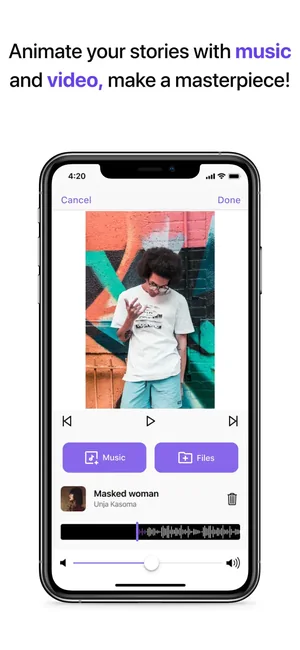
Filters and dynamic slideshows with music carry the motion, and stickers and emojis follow the current reel trends — so a post looks finished without a separate editor.
Key features
- Wide array of templates and layouts
- Lots of stickers and emojis for reel trends
- Various filters to create dynamic slideshows with music
When people use it
Posting something that looks composed
A template does the layout decisions, so a quick post does not look like a quick post.
Keeping a set consistent
Collections are grouped by look — business, minimal, fitness — so a run of posts holds together.
Turning stills into motion
A slideshow with music makes a set of photos into something that plays, without a separate video editor.
Finishing in one place
Stickers, emoji and text sit in the same editor as the template, so there is no round trip to another app.
How it works
Pick a template
Browse the collections and choose the layout that fits what you are posting.
Drop your photos in
Your images take the template's places; the composition stays as designed.
Add text and stickers
Layer wording, stickers and emoji over the image.
Add motion and music
The reel editor turns a set into a slideshow with music behind it.
Save and post
Export the result and publish it in your social app.
Good to know
- The app prepares the post; it does not publish or schedule it. Posting happens in your social app.
- This page does not state export formats, resolutions or video length, because none are published for this listing. Export a test before planning a piece of work around it.
- Music you add must be cleared for the platform you post to. Social networks mute or block audio they do not have rights for, and that is decided there, not here.
- Templates are fixed compositions. A photo whose subject sits where the template puts text will fight it — choose the template to suit the shot rather than the reverse.
Pricing and privacy
Free · In-App Purchases. Subscriptions and purchases are handled by Apple; you can review or cancel them in your Apple Account settings.
Privacy Policy · EULA · Support and refunds
Facts on this page come from the App Store listing and the app's own screens, and were last checked on . Something out of date? Tell us.
Questions about Story Templates & Reels Maker
Can it post to Instagram for me?
No. It builds the story or reel and exports it; publishing happens in your social app.
What formats does it export?
Not published for this listing, so we do not state one. Run a test export before committing to a project that needs a specific size.
Can I use any music?
You can add music in the editor, but whether it survives on the platform depends on that platform's rights checks, not on this app.
What is the difference between a story and a reel here?
A story template is a still composition you fill with your photos. The reel editor adds motion — slideshows with music — over the same material.