AI Calorie Counter for iPhone
Understand what you eat.
- App Store name
- Calorie Counter AI & Tracker
- Category
- Health & Fitness
- Price
- Free · In-App Purchases
- Requires
- iOS 15.6+
- Languages
- 12
- On the App Store since
- 2025
- Last updated
- 2026
What it does for you
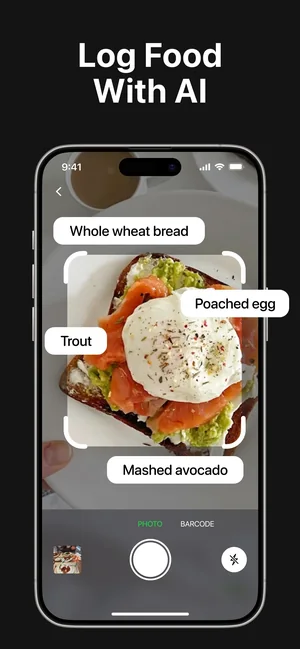
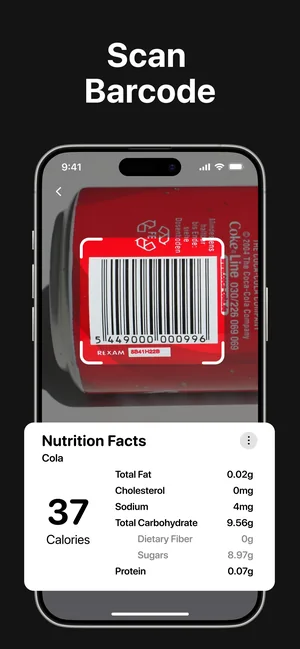
The reason most food diaries get abandoned is the typing. Calorie Counter AI removes it: point the camera at a plate and the scanner recognises what is on it, or scan a barcode and the nutrition facts come straight back.
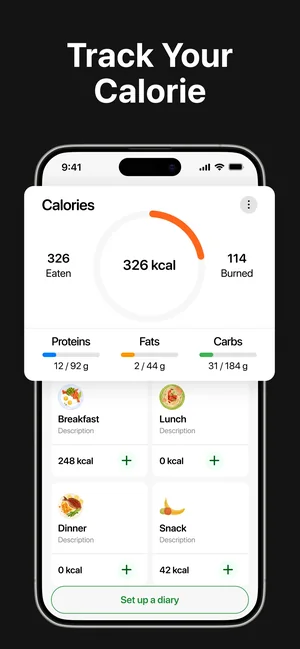
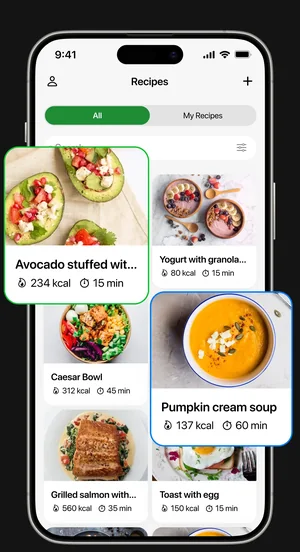
What lands is a day you can read at a glance — a ring showing eaten against burned, with protein, fat and carbohydrates underneath — plus water, activity and a weight trend. A recipe keeper with filters by calories, time and ingredients turns it from a record of yesterday into a plan for tonight.
About this app
Calorie Counter AI makes food logging fast enough to actually do: scan a meal with the AI food scanner or a barcode and get calories and macros instantly. Carbohydrates, proteins, fats and water all land in one clear daily picture.
Set a goal — intake, weight, activity — and the app tracks progress with statistics that stay readable. A recipe keeper with smart filters by calories, time and ingredients helps plan the next meal, not just record the last one.
Key features
- AI food scanner for quick meal logging
- Calories, macros, water and activity tracking
- Goals with clear progress statistics
- A recipe keeper with smart filters
When people use it
Logging a meal without typing it
Photograph the plate; the scanner picks out the components — bread, egg, avocado — and logs them together.
Packaged food, exactly
A barcode scan returns the manufacturer's own nutrition figures, which is the most accurate route the app has.
Watching macros rather than just calories
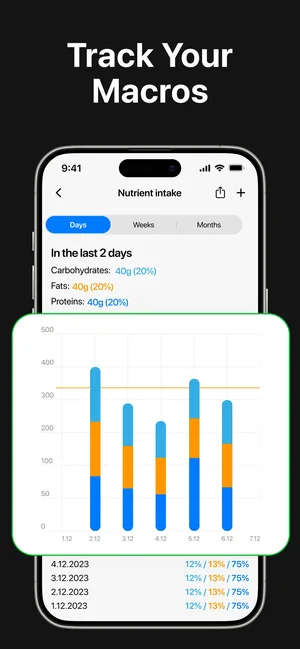
Carbohydrate, fat and protein charts run across several days, which is what you need when the split matters more than the total.
Tracking a goal over time
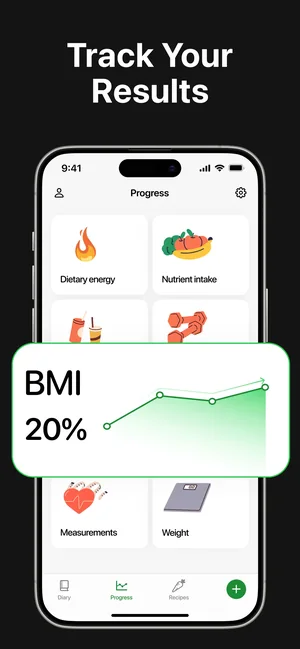
Weight trend, BMI and body measurements sit on one progress screen so a slow change is visible.
How it works
Set a goal
Intake, weight or activity — the daily targets follow from it.
Log by camera or barcode
Scan the plate for a cooked meal, the barcode for anything packaged.
Correct what it got wrong
Check the recognised items and portion sizes and adjust before saving. This step is the difference between a useful diary and a misleading one.
Add water and activity
Both feed the same daily picture as food, so the ring reflects the whole day.
Plan the next meal
Filter the recipe keeper by calories, time or ingredients rather than starting from an empty plan.
Good to know
- Photo recognition estimates. It cannot see oil in the pan, sugar in the sauce or how big the portion really is, so treat a scanned meal as a starting figure and correct the portion — a barcode scan is always more accurate than a photograph.
- This app is not a medical device and gives no medical advice. If you are managing diabetes, an eating disorder, pregnancy or any condition where intake matters clinically, work with a professional rather than an app.
- Food database coverage varies by country and by brand. Local and own-brand products are the most likely to be missing or approximate.
- Body measurements and BMI are entered or estimated, not measured by the phone. BMI in particular is a crude indicator and says nothing about body composition.
Pricing and privacy
Free · In-App Purchases. Subscriptions and purchases are handled by Apple; you can review or cancel them in your Apple Account settings.
Privacy Policy · EULA · Support and refunds
Facts on this page come from the App Store listing and the app's own screens, and were last checked on . Something out of date? Tell us.
Questions about Calorie Counter AI
How accurate is scanning a meal from a photo?
It is an estimate. The scanner identifies what it can see, but hidden fats, sauces and portion size are exactly what a photograph cannot show. Use it to log quickly, then correct the portion — and use barcodes for packaged food, which are far more precise.
Does it track macros as well as calories?
Yes — carbohydrates, proteins and fats are tracked alongside calories, with charts across several days.
Can I fix an entry the scanner got wrong?
Yes, and you should. Check the recognised items and the portion before saving; that correction step is what keeps the diary honest.
Can it tell me what I should eat?
No. It records intake and shows progress against a goal you set. It gives no dietary or medical advice, and it is not a substitute for a dietitian or doctor.