Plant Identifier App for iPhone — Leafora AI
A personal botanist in your pocket.
- App Store name
- Plant Identifier - Leafora AI
- Category
- Education
- Price
- Free · In-App Purchases
- Requires
- iOS 15.0+
- Languages
- 12
- On the App Store since
- 2025
- Last updated
- 2026
What it does for you
Point the camera at a plant and Leafora names it and describes it. That is the first question answered — but the more useful ones come after, when the plant is already yours and something is wrong with it.
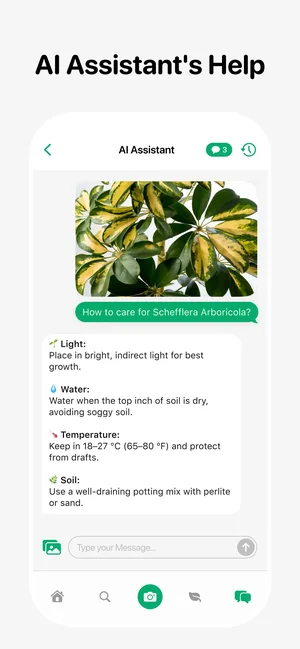
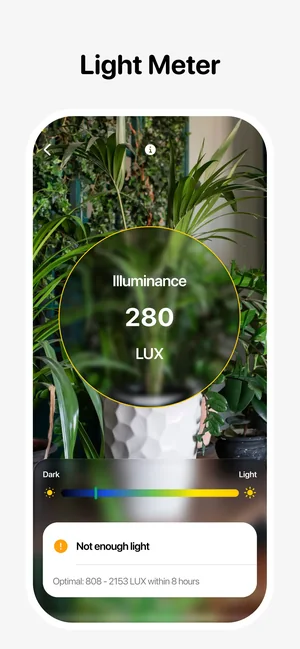
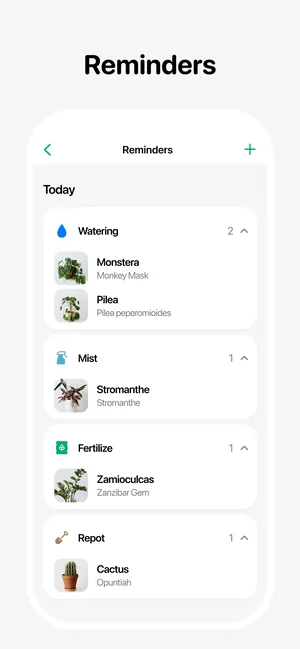
The app photographs a damaged leaf and suggests what the damage looks like, measures whether the corner you chose is bright enough with a light meter that reads in lux, keeps watering and fertilising on a reminder list, and answers follow-up questions through an assistant. A journal records how each plant has actually done.
About this app
Leafora identifies a plant from one photo and then keeps it alive: the app diagnoses diseases and pests, suggests treatment, and builds a care routine with watering, fertilising and repotting reminders tailored to each plant.
A built-in light meter finds the right spot in a room, a water tracker keeps the schedule honest, and a digital journal with photos and notes records how your little forest grows. An AI assistant answers plant questions anytime.
Key features
- Identify plants from a photo in seconds
- Spot diseases and get treatment guidance
- Care schedules, reminders and a water tracker
- Light meter and a digital plant journal
When people use it
Naming something you have just met
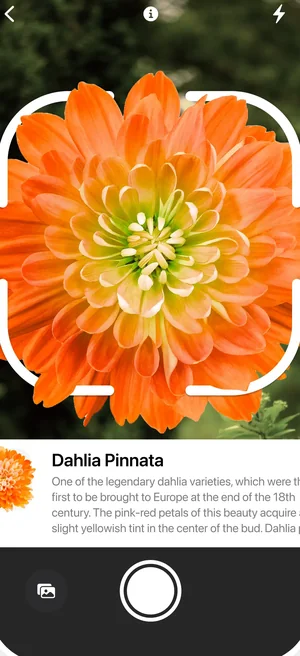
One photograph gives you the species and a description — enough to know whether a plant belongs indoors, needs shade, or should be kept away from pets.
Working out what is eating a leaf
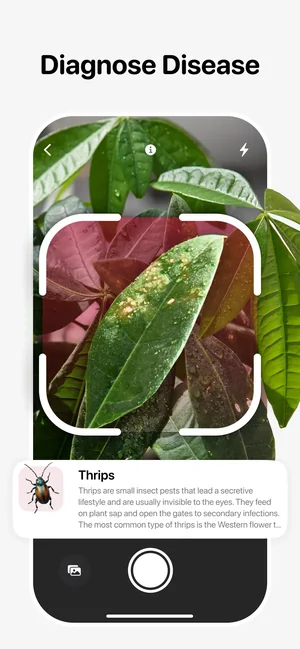
Photograph the damage and the diagnosis screen names the likely cause — thrips damage, for example — with notes on what to do about it.
Finding the right spot in a room
The light meter estimates the light level in lux where you are standing and warns when the spot is too dark for that plant. Two metres from the window can be a different plant's habitat entirely.
Not killing it by forgetting
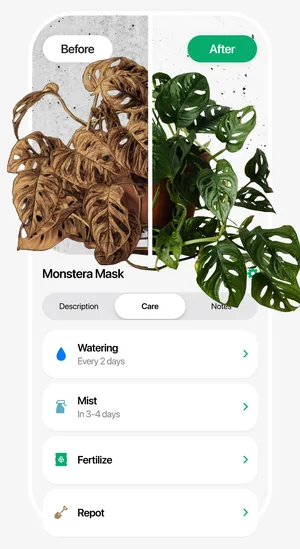
Watering and fertilising reminders per plant, and a journal with photographs, turn care into something you can see rather than remember.
How it works
Photograph the plant
Fill the frame with one plant in daylight; the species name and description appear underneath.
Diagnose a problem
For a sick plant, photograph the affected leaf close up and open the diagnosis screen for the likely cause and treatment notes.
Measure the light
Hold the phone where the plant will live; the app estimates the light level in lux and warns when the spot is too dark.
Set up care
Add the plant to your list and let the reminders handle watering and fertilising.
Keep the journal
Photograph the plant occasionally. The journal makes slow change visible in a way memory does not.
Good to know
- Identification is a suggestion, not a determination. Look-alike species exist, and a blurred, distant or partial photograph makes a wrong answer more likely — check the description against the plant before acting on it.
- Never use this app to decide whether a plant, berry or mushroom is safe to eat or touch. It is not built for that and a mistake there is dangerous.
- Disease diagnosis works from visible symptoms only. Root problems, watering history and soil conditions do not show up in a photograph of a leaf.
- The light meter gives an estimated lux value, not a laboratory measurement — useful for comparing one spot in your home against another, not as an absolute figure.
Pricing and privacy
Free · In-App Purchases. Subscriptions and purchases are handled by Apple; you can review or cancel them in your Apple Account settings.
Privacy Policy · EULA · Support and refunds
Facts on this page come from the App Store listing and the app's own screens, and were last checked on . Something out of date? Tell us.
Questions about Plant Identifier — Leafora
How accurate is the identification?
It is a suggestion based on the photograph, and it works best with one plant filling the frame in good light. Similar-looking species can be confused, so treat the answer as a starting point and confirm it against the description.
Can it tell me if a plant is poisonous or safe to eat?
Do not use it for that. Identification apps make mistakes, and with foraging or a child and a berry the cost of a mistake is far too high. Ask a specialist or poison information service.
What does the light meter actually measure?
It estimates the light level where you are holding the phone and shows it in lux, with a warning when the spot is too dark for the plant you selected. It is a way to compare places in your home, not a scientific instrument.
Does it remind me to water?
Yes — each plant gets its own watering and fertilising reminders, listed together so several plants can be looked after at once.