Fonts & Keyboard Skins for iPhone
Custom fonts, keyboard skins and symbols that follow you into every app.
- App Store name
- Font, Keyboard Skin for iPhone
- Category
- Utilities
- Price
- Free · In-App Purchases
- Requires
- iOS 15.0+
- Languages
- 31
- On the App Store since
- 2023
- Last updated
- 2026
What it does for you
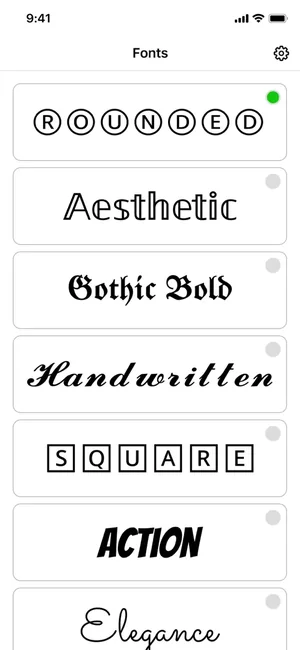
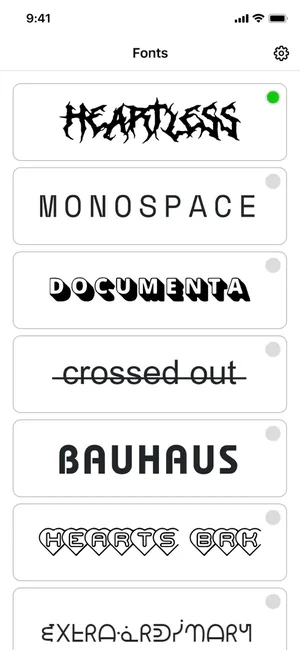
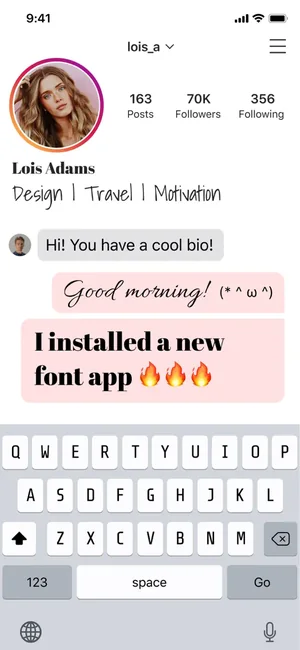
iOS gives you one keyboard and one set of letterforms. This app installs a second keyboard that types in styled characters — rounded, gothic, handwritten, monospace, crossed out and a long list besides — so a bio, a caption or a message can look like something other than the system font.
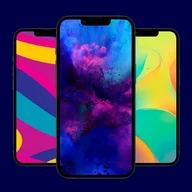
Alongside the fonts there are keyboard skins, kaomoji, graffiti and a hashtag helper, all reachable from the keyboard itself rather than from a separate app you have to copy out of.
About this app
Dream of a beautiful and modern font keyboard for your device? Transform your keyboard with our amazing app, designed to make your device look totally unique and personalized! Explore a vast collection of stylish fonts, vibrant keyboard skins, expressive kaomojis, trending hashtags, and creative graffiti, and make your texts and social media profiles truly unforgettable.
– Select vibrant skins for your keyboard; – Use trendy, beautiful fonts for your texts; – Express your emotions with funny kaomoji; – Amaze your friends with custom sticker fonts; – Easily add popular hashtags to your posts; – Decorate your messages with unique graffiti.
Key features
- Allow yourself everything
- Stylish Skins & Fonts
- Sticker Fonts, Kaomojis & Graffiti
- Hashtags for Quick Posting
When people use it
A profile bio that stands out
Social profiles render styled characters, which is where these fonts are most visible and most used.
Captions and comments
A styled line in a caption reads differently from the same words in the default font.
Expression beyond emoji
Kaomoji and graffiti sit on the same keyboard, so they do not need a separate app and a copy-paste.
Posting faster
The hashtag helper keeps sets of tags to hand instead of retyping them for every post.
How it works
Install the app
The keyboard arrives with it, but is not switched on yet.
Add the keyboard in iOS Settings
Settings, General, Keyboard, Keyboards, Add New Keyboard — then pick this one. This is an iOS step; no app can do it for you.
Decide about Full Access
Some features of any third-party keyboard require Full Access. Read the note below before granting it.
Switch to it while typing
Tap and hold the globe key on the keyboard and choose it.
Pick a font and type
Choose a style and the characters come out styled, ready to paste anywhere you were already typing.
Good to know
- Full Access is the thing to understand before you grant it. iOS warns that a keyboard with Full Access can transmit what you type; grant it only if you accept that, and be aware you can revoke it in Settings at any time. Avoid any third-party keyboard for passwords, card numbers and other secrets — switch back to the system keyboard for those.
- Styled fonts are not really fonts. They are Unicode characters that look like styled letters, which is why they survive a copy and paste — and why some apps, some systems and some screen readers display them as boxes or read them out one symbol at a time.
- For the same reason, styled text can hurt accessibility and can sometimes be treated oddly by search inside an app. Use it for decoration, not for anything that must be read reliably.
- Keyboard skins apply inside this keyboard, not to the system keyboard everywhere else on the phone.
Pricing and privacy
Free · In-App Purchases. Subscriptions and purchases are handled by Apple; you can review or cancel them in your Apple Account settings.
Privacy Policy · EULA · Support and refunds
Facts on this page come from the App Store listing and the app's own screens, and were last checked on . Something out of date? Tell us.
Questions about Font, Keyboard Skin for iPhone
Do I have to give the keyboard Full Access?
Some features require it. iOS warns that a keyboard with Full Access can transmit what you type, so grant it deliberately, never type passwords or card numbers on any third-party keyboard, and remember you can turn Full Access off again in Settings, General, Keyboard.
Why do my fancy fonts show as boxes for some people?
Because they are Unicode characters rather than a real font. If the receiving app, system or font does not include those characters, they fall back to boxes. Test in the app you actually post to before using them somewhere that matters.
How do I switch to the keyboard?
Add it once in Settings, General, Keyboard, Keyboards, Add New Keyboard. After that, tap and hold the globe key while typing and choose it.
Will the styled text work in my Instagram bio?
Styled characters generally paste into social profiles, which is the most common use. Support is per-platform though, so check how it renders before you leave it there.